At a glance
- LinkedIn’s User Agreement prohibits bots and unauthorised automation for adding contacts and sending messages.
- The risk isn’t abstract. Restricted accounts usually belong to your best reps, along with their networks and conversations.
- The safer setup: Sales Navigator, its CRM sync where your licence includes it, CRM tasks that prompt reps, and AI-drafted messages a human reviews and sends.
- You keep most of what automation promised: tracking, sequencing discipline and personalisation at scale.
- Third-party automation is only worth considering with documented permission and your own compliance review.
The pitch for LinkedIn automation tools is simple: connect them to your reps’ accounts, upload a list, and let the tool send connection requests and follow-ups while everyone sleeps.
It’s tempting, especially when leadership wants more pipeline and LinkedIn is where your buyers are.
But there’s a problem most demos skip.
What LinkedIn’s rules say
LinkedIn’s User Agreement lists what members agree not to do. In section 8.2, that includes using “bots or other automated methods to access the Services, add or download contacts, send or redirect messages.”
LinkedIn also publishes a help page on prohibited software and extensions, which covers third-party tools that scrape, automate activity or change how the site works.
Tools that send connection requests or messages on a rep’s behalf, from the rep’s account, without the rep doing it, fall squarely into that territory. A vendor saying their tool is “safe” or “undetectable” doesn’t change the agreement your reps signed.
(This is a practical reading of the published terms, not legal advice. Your legal team should make the call for your company.)
The real cost of getting it wrong
When LinkedIn detects automation, it can restrict or suspend the account. Think about whose accounts those are:
- Your top reps, who have the biggest networks and the most active conversations.
- Your leaders, whose profiles carry the brand.
- Years of relationships and message history, suddenly unreachable.
Then add the softer costs. Prospects can usually tell when a message was sent by a machine. A generic “I’d love to connect” sequence teaches your market to ignore your company’s name.
The pipeline you were trying to build is the thing that’s put at risk.
The approved route
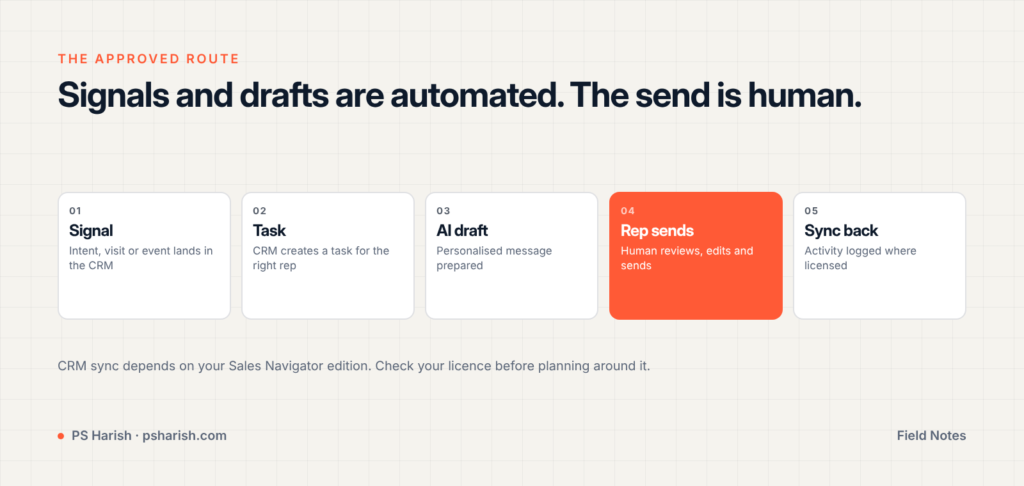
The alternative isn’t “do everything by hand”. It’s to automate everything around the send, and leave the send itself to a person.
1. Signals live in your CRM
Intent surges, website visits by target accounts, webinar attendance and score changes all land on the lead or account record. That’s where outreach decisions start.
2. The CRM creates the task
When a signal crosses a threshold, a Salesforce Flow (or the equivalent in your CRM) creates a task for the right rep: who to contact, why now, and what they engaged with.
3. AI drafts the message
The task includes a personalised draft based on the person’s role, company and recent activity. The rep doesn’t start from a blank page.
4. The rep reviews and sends
The rep edits the draft and sends it from LinkedIn or Sales Navigator. A human decides, a human sends, and the message sounds like them.
5. Activity syncs back
Where your Sales Navigator edition includes CRM sync, activity such as InMails and notes can be logged back to the CRM. Check what your licence covers, because CRM sync isn’t included in every edition.
What you still get
This setup keeps most of what automation tools promise:
- Tracking. Signals, tasks and outcomes all live in the CRM, so you can report on LinkedIn’s contribution to pipeline.
- Sequencing discipline. Tasks arrive in the right order at the right time, so follow-ups don’t get forgotten.
- Personalisation at scale. AI drafts do the heavy lifting; reps add judgment.
- Speed. Reps act on signals the same day, instead of working a static list.
What you give up is volume for its own sake. In B2B, where a buying committee might be six people at one account, that’s rarely the constraint.
When could third-party tools be OK?
Some tools work through official LinkedIn partner programmes or APIs, and those are a different category from tools that drive a rep’s account in the background.
Before you use anything that touches LinkedIn on your reps’ behalf:
- Ask the vendor for documented permission from LinkedIn, such as partner programme status, not just a claim that it’s “safe”.
- Run it through your own compliance and InfoSec review.
- Check what data the tool collects from your reps’ accounts, and where it stores it.
If the answers are vague, don’t connect it.
FAQs
The main issue is LinkedIn’s contract terms rather than criminal law. Using bots to send messages or add contacts breaks the User Agreement, and LinkedIn can restrict accounts that do. Data protection laws can also apply when tools scrape and store personal data.
Only some editions do. Check your contract or admin settings before planning around it.
Writing a draft with AI and having a rep review and send it is very different from a bot sending messages. Keep a human in the loop and make sure the message is accurate and personal.
Signal-based tasks. Reach out when an account shows interest, with a message that references what they did. Fewer messages, better timing, and conversations that start from something real.
Want outreach that scales without risking your reps’ accounts? It’s part of the engagement workstream in my MarTech Stack Development service.
By PS Harish
19 October 2026Comments
No comments yet.

-
- Your E-commerce Website Is Live. Now What? Oct 17, 2026


Leave A Comment