15 tool categories to build the business behind your storefront
Launching an online store feels like the hard part. The catalog is ready, checkout works and the first orders begin to arrive.
Then the work spreads. A customer asks where their package is. A supplier needs a purchase order. Stock on the website disagrees with stock on a marketplace. The payment payout does not match yesterday’s sales total.
The website gives customers a place to buy. Behind it, the business needs a way to measure demand, deliver orders and look after customers. As sales grow, those workflows need to stay reliable without depending on the founder remembering every detail.
That does not mean buying a large collection of apps. Your commerce platform may already include much of what you need. The useful question is: which capability is missing, and what problem would improving it solve?
The right time follows the business problem
It is tempting to say that extra tools become necessary after the first two or three months. Some foundations cannot wait that long. You need a fulfillment process, payment handling and transaction records from your first sale. You should also establish measurement before spending heavily to bring people to the store.
Other capabilities depend on your business model. A replenishable product may suit subscriptions. A small store with a simple catalog may operate comfortably without specialist inventory software. A founder answering a handful of emails may only need a monitored inbox.
Use four stages to plan the work:
- Launch: establish reliable basics before taking orders.
- Validate: learn from your first visitors and customers.
- Repeat: make the customer experience consistent and support relevant repeat purchases.
- Scale: handle more channels, products, locations or people without losing control.
These stages overlap. They describe needs rather than fixed monthly revenue or order counts. Here are the capabilities to consider, with five practical uses for each.
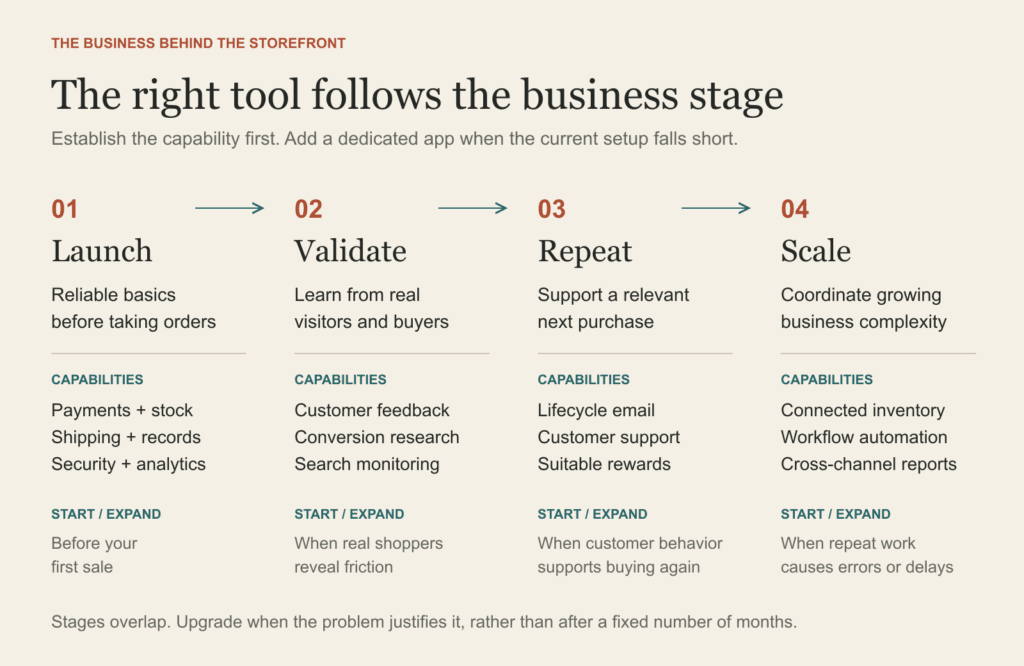
Choose capabilities by business need. The stages overlap and have no fixed monthly threshold.
Review your own store
Use the E-commerce Operations Health Check to mark each capability as working, needing attention, or not relevant yet. Then choose three improvements with an owner and a success measure.
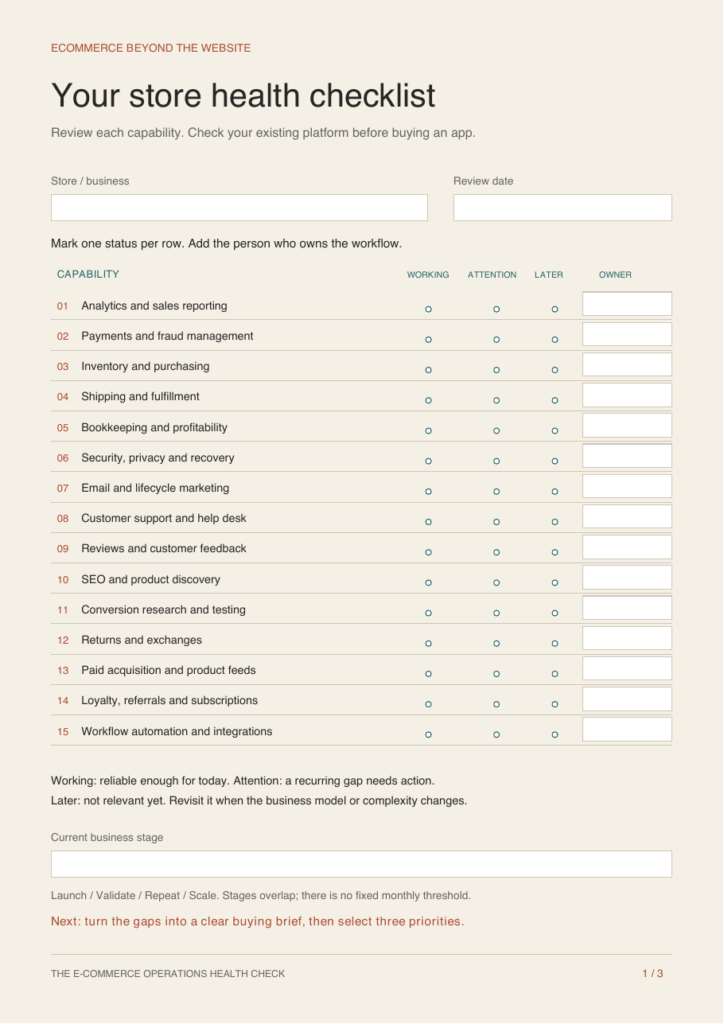
Download the three-page fillable health check
It includes the checklist, a five-step tool decision process, and a worksheet for your next three priorities. You can type into the PDF or print it.
1. Analytics and sales reporting
When to start: Before you send traffic to the store.
A product gets plenty of visits but few purchases. Funnel reporting helps you decide where to investigate before buying more traffic.
Five practical uses:
- Identify where visitors come from.
- Measure product views, carts, checkouts and purchases.
- Compare products that attract attention with products that sell.
- Find differences between mobile and desktop conversion.
- Track average order value and repeat purchases.
When to upgrade: When native reports cannot answer questions across your sales channels.
Start with your commerce platform’s reports. Add deeper analytics when you have a clear question and reliable tracking.
2. Payments and fraud management
When to start: Before accepting your first payment.
An order looks unusually risky. A review workflow helps your team investigate before sending the goods.
Five practical uses:
- Offer payment methods relevant to your customers.
- Monitor failed payments and investigate causes.
- Flag suspicious orders for human review.
- Process refunds and track their status.
- Organize evidence for payment disputes.
When to upgrade: When payment failures, disputes or manual reviews become recurring problems.
Use your payment provider’s native controls first. Review suspicious orders rather than assuming every flag proves fraud.
3. Inventory and purchasing
When to start: Before listing products available for sale.
Your website and marketplace sell the last unit at nearly the same time. Connected stock records reduce the chance of promising inventory you cannot deliver.
Five practical uses:
- Track available stock by product variant.
- Set low-stock alerts.
- Reduce overselling through stock synchronization.
- Prepare purchase orders using supplier lead times.
- Identify slow-moving stock.
When to upgrade: When multiple channels, warehouses, bundles or suppliers make stock difficult to reconcile.
A simple stock record may work initially. Add dedicated inventory software when reconciliation or replenishment becomes unreliable.
4. Shipping and fulfillment
When to start: Before the first order needs dispatch.
An order is paid but never reaches the dispatch queue. An exception report makes that gap visible.
Five practical uses:
- Generate shipping labels.
- Compare delivery services for each shipment.
- Send tracking updates.
- Flag delayed or undelivered orders.
- Route orders to the appropriate fulfillment location.
When to upgrade: When repetitive entry, late dispatch or multiple fulfillment locations create friction.
Define who packs, dispatches and checks exceptions. Software cannot compensate for an unowned fulfillment process.
5. Bookkeeping and profitability reporting
When to start: Record transactions from the first sale.
Revenue rises while cash feels tight. Reconciliation and cost records help reveal fees, refunds and other outflows.
Five practical uses:
- Reconcile orders with payment payouts.
- Record fees, refunds and operating expenses.
- Maintain product cost records.
- Estimate contribution margin after variable costs.
- Prepare organized records for financial review.
When to upgrade: When manual reconciliation becomes slow or produces unexplained differences.
Keep product costs current. Distinguish revenue, contribution margin and final business profit when reviewing results.
6. Security, access, privacy and recovery
When to start: Before collecting customer information or granting staff access.
A staff account changes a product catalog by mistake. Appropriate access and a tested recovery process limit the disruption.
Five practical uses:
- Enable multifactor authentication.
- Give each staff member appropriate access.
- Manage tracking and marketing consent preferences.
- Back up supported store data.
- Test recovery after accidental changes or deletion.
When to upgrade: As staff, integrations and selling markets expand.
Check what your platform can actually restore. An export file alone does not prove you can recover the complete store.
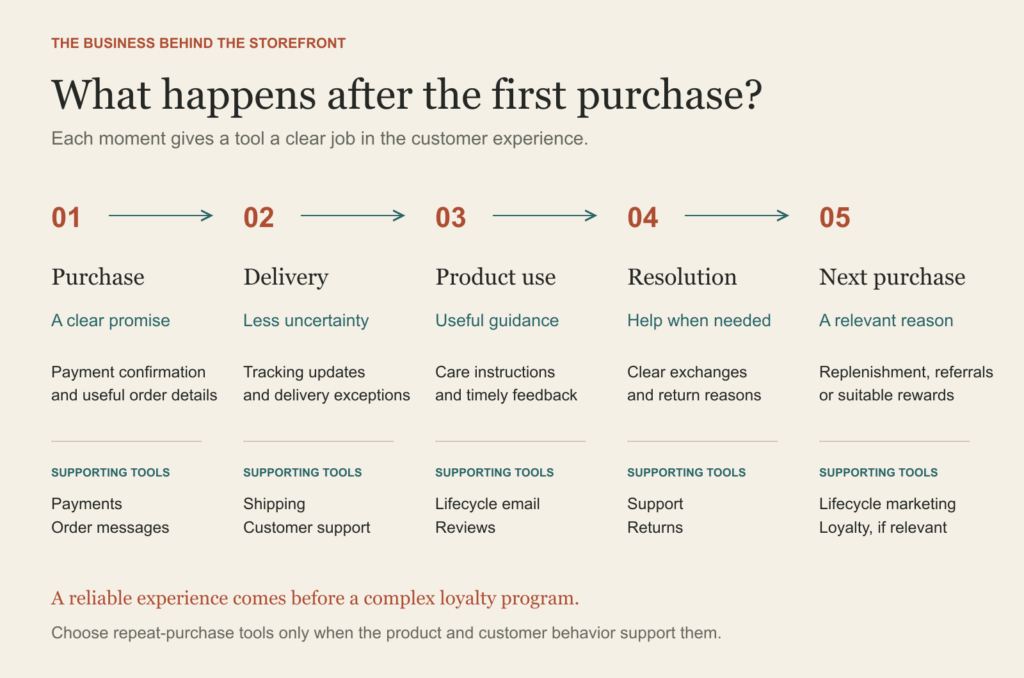
Give each tool a specific job in the customer experience.
7. Email and customer lifecycle marketing
When to start: Begin permission-based subscriber capture at launch.
Someone buys a product that needs regular replenishment. A well-timed reminder can be more useful than a generic promotion.
Five practical uses:
- Capture subscribers with appropriate permission.
- Send a useful welcome sequence.
- Follow up on eligible abandoned checkouts.
- Send product care or usage guidance after purchase.
- Run relevant replenishment and win-back campaigns.
When to upgrade: As your audience grows and different buying patterns justify segmentation.
Begin with a few useful messages. Match timing to the product and respect consent and unsubscribe preferences.
8. Customer support and help desk
When to start: Provide a monitored contact channel from launch.
A customer asks about the same delayed order in email and chat. A shared record gives the next agent the context.
Five practical uses:
- Bring customer inquiries into one queue.
- Answer order-status questions.
- Reuse answers to common questions.
- Assign unresolved issues and track ownership.
- Identify recurring product and delivery complaints.
When to upgrade: When inquiries get lost or multiple people need to coordinate responses.
A monitored inbox and clear FAQs may be enough initially. Add a help desk when handoffs and visibility become difficult.
9. Reviews and customer feedback
When to start: After customers have received and used the product.
Several customers mention the same sizing issue. Their feedback can improve both the product page and future purchasing decisions.
Five practical uses:
- Request reviews after a suitable usage period.
- Display verified purchase feedback where supported.
- Collect customer photos with permission.
- Identify recurring objections and defects.
- Route negative feedback for follow-up.
When to upgrade: When manual collection and follow-up stop being consistent.
Collect honest feedback. Avoid treating a review request as a request for positive feedback only.
10. SEO and product discovery
When to start: Set up search visibility and useful product content at launch.
Shoppers search for a product use case your category page barely explains. Better content can help the page answer that need.
Five practical uses:
- Check whether important pages appear in search indexes.
- Find the search queries that bring visitors.
- Improve product and category information.
- Detect broken links and crawl issues.
- Develop buying guides around customer questions.
When to upgrade: When organic search becomes a meaningful acquisition opportunity.
Begin with clear product information and basic search monitoring. Expand research and auditing as the catalog grows.
11. Conversion research and experimentation
When to start: When real visitors arrive and you can observe friction.
Mobile visitors reach a product page but struggle to find delivery information. Observation suggests a specific improvement to investigate.
Five practical uses:
- Find confusing navigation.
- Observe shopper friction using privacy-conscious behavior analysis.
- Collect feedback on the website.
- Investigate product-page and checkout drop-offs.
- Test changes to copy, offers or layouts.
When to upgrade: Use controlled A/B tests when traffic supports a meaningful comparison.
Use interviews and qualitative research early. A low-traffic A/B test can produce a misleading winner.
12. Returns and exchanges
When to start: Define the return process before the first sale.
Returns cluster around one size. Structured reasons help distinguish a sizing problem from a shipping issue.
Five practical uses:
- Collect structured return requests.
- Apply return eligibility rules consistently.
- Offer suitable exchanges.
- Track refunds and returned inventory.
- Analyze return reasons by product or size.
When to upgrade: When requests become repetitive or the product category has frequent returns.
A clear manual process can work initially. Add a portal when it saves meaningful effort and improves visibility.
13. Paid acquisition and product feeds
When to start: Before launching paid campaigns.
An ad promotes a sold-out product. A connected product feed can help keep availability current.
Five practical uses:
- Publish accurate product catalogs to advertising channels.
- Measure campaign purchases with appropriate consent.
- Exclude unavailable products from relevant campaigns.
- Compare campaign economics using order and cost data.
- Coordinate product-specific campaigns and eligible retargeting.
When to upgrade: When catalog size or campaign complexity makes manual updates error-prone.
Set up measurement before increasing spend. Advertising is optional, and reported return on ad spend does not equal business profit.
14. Loyalty, referrals and subscriptions
When to start: When the product and customer behavior support repeat purchases.
A replenishable product may suit recurring delivery. A rarely replaced product may benefit more from referrals.
Five practical uses:
- Reward repeat purchases.
- Encourage customer referrals.
- Offer relevant customer tiers.
- Support recurring delivery for suitable products.
- Evaluate whether incentives produce profitable repeat business.
When to upgrade: When evidence shows incentives or recurring delivery can add profitable value.
Choose the mechanism that fits the business. Loyalty, referrals and subscriptions are separate options, not a compulsory bundle.
15. Workflow automation and integrations
When to start: When a stable repeated task consumes time or causes errors.
A team member copies the same order data into another system every morning. A monitored integration can remove that repeat task.
Five practical uses:
- Sync orders with accounting records.
- Route support issues by type.
- Trigger low-stock notifications.
- Alert the team to fulfillment exceptions.
- Produce scheduled operating reports.
When to upgrade: When disconnected systems or growing volume require coordinated workflows.
Name the workflow owner, define a failure alert and document the manual fallback before relying on an automation.
A simple way to choose your next tool
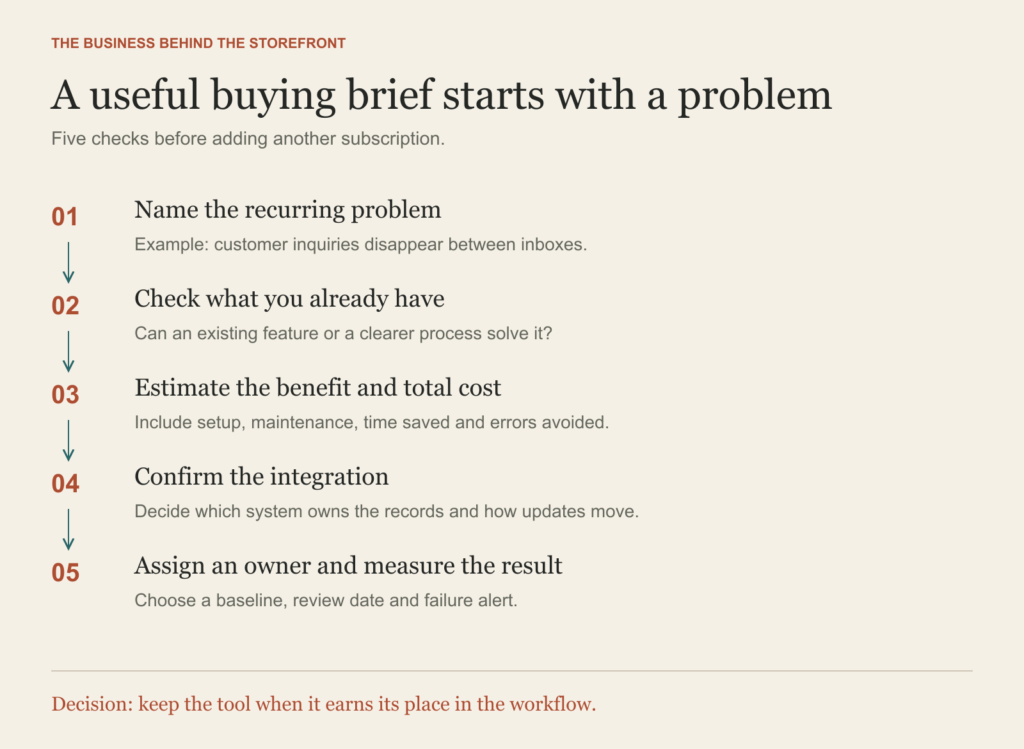
Use a concrete problem and a measurable result to evaluate your next subscription.
Start with the problem you can describe in an ordinary sentence: “We lose track of customer inquiries” or “Our stock records disagree.” That gives you a better buying brief than “We need more automation.”
First check your current platform. A feature you already pay for may solve the problem with a little setup. If it cannot, estimate the value of improving the workflow. Consider time saved, errors avoided and customer impact alongside subscription fees, setup effort and ongoing maintenance.
Then check the integration. Decide which system owns the important records and how updates travel between systems. Two tools that both claim to own stock levels can create more work than they remove.
Finally, name the owner and choose a measure. For support, that might be the number of unresolved inquiries. For fulfillment, it might be the proportion of orders dispatched on time. Set a review date and compare the result with your baseline.
Your next step
Write down the task that creates the most recurring friction in your store today. Identify the capability that would improve it. Check whether you already have it, then make one focused change and measure the result.
Your website is the storefront. Reliable workflows help you keep the promises customers make purchases on.
Get your store health check
What does your store need next?
Download the E-commerce Operations Health Check to review 15 capabilities and choose your next three improvements. Set an owner, a deadline and a success measure for each one.
The download is free to access directly. No email signup is required.
Sources and scope
The stage framework and examples are editorial recommendations for founders selling physical products through their own online store. They are not universal order-volume thresholds. Platform features and availability vary.
- Shopify: E-commerce marketing tools — native and specialist marketing capabilities.
- Shopify Help Center: Analytics — sales, sessions and fulfillment reporting.
- Shopify Help Center: Customer service — customer support channels and workflows.
- Shopify: E-commerce automation tools — automation across marketing, support and operations.
- Shopify Help Center: Customer privacy settings — tracking and consent settings.
These sources establish capability examples, not independent proof that a tool will improve any particular store’s results. This guide deliberately avoids vendor rankings, pricing claims and guaranteed outcomes.