A few weeks ago I got into it with an e-commerce founder.
My argument was simple: a lot of low-consideration buying is about to stop being a human activity. Dish soap. Printer ink. The water filter you replace every six months. Nobody enjoys those purchases. Nobody comparison-shops them. They are pure friction, and friction is exactly what an AI agent is for.
His answer was just as simple. “My customers won’t do that. People want to see the product. They want to choose.”
I didn’t have proof. I had a hunch and 26 years of watching channels shift out from under people who were certain they wouldn’t.
Then Chrome shipped a Lighthouse category called Agentic Browsing, and I stopped needing the hunch.
Key Takeaways
- Chrome’s Lighthouse has a new experimental category, Agentic Browsing, which asks how well a site is built for machine interaction rather than how it feels to a human. There’s no 0–100 score, only a pass ratio and pass/fail flags, because the standards for the agentic web are still emerging.
- It checks four things: WebMCP, the accessibility tree, Cumulative Layout Shift, and llms.txt.
- Agents don’t see your page. They read the accessibility tree, the same structure a screen reader uses. Your accessibility markup is now your API, whether you designed it that way or not.
- A green llms.txt check only means something was served without a server error. The audit doesn’t parse the file or follow its links. My site passed while its file pointed AI agents at my local development environment.
- The bottleneck for agentic commerce is capability, not customer intent. If an agent can’t complete a purchase on your store, the behaviour has nowhere to land, and you’ll never see the demand in your data.
Browser vendors don’t build audits for demand that isn’t coming
Lighthouse is the tool sitting behind PageSpeed Insights — the thing every marketer has run on their homepage at least once to get a number they can put in a slide. It has had the same four categories since Lighthouse retired its Progressive Web App category in 2024: Performance, Accessibility, Best Practices, SEO.
There is now a fifth one, and it isn’t asking how your site feels to use. It asks how well your site is constructed for machine interaction.
That is the part worth sitting with. Chrome is spending engineering budget building measurement infrastructure for AI agents transacting on websites. You don’t build a diagnostic tool for a behaviour you think might show up eventually. You build it when you need the ecosystem to be ready before the traffic arrives. The discovery side of this has already arrived. I wrote about how most e-commerce brands are already invisible to AI search.
It’s experimental — it needs Chrome 150 or later, and the WebMCP portions require registering for an origin trial. But experimental at Google means “we’re building it,” not “we’re wondering about it.”
The most honest thing about it: there’s no score
Every other Lighthouse category gives you a number from 0 to 100. This one doesn’t, and the reasoning in the docs is unusually candid:
Because the standards for the agentic web are still emerging, the current focus is to gather data and provide actionable signals rather than a definitive ranking.
Instead you get a fraction — how many agentic-readiness checks you pass — plus pass/fail flags and some informational counts.
I find this more convincing than a score would have been. A 0–100 number implies the standard is settled and the industry has agreed on what “good” means. It also, inevitably, gets gamed; we all watched what a decade of chasing the Performance score did to how people build sites. A pass ratio says something different: we are early, we are collecting data, and we want the signal to be actionable rather than braggable.
That’s what genuinely new infrastructure looks like before it hardens.
What it actually checks
Four things, in plain language.
WebMCP. A proposed standard for a site to explicitly declare what an agent can do on it — not just what it can read. Search the catalogue. Add to cart. Check order status. You can define these declaratively in HTML or register them in JavaScript, and Lighthouse queries the Chrome DevTools Protocol’s WebMCP domain to see which ones actually appear. This is the difference between an agent guessing its way through your UI and your site handing it a menu of supported operations.
The accessibility tree. This is the one that reframed things for me. Agents don’t see your page. They read the accessibility tree — the same structured representation a screen reader uses. Lighthouse pulls out the subset of a11y checks that matter most for machine interaction: does every interactive element have a programmatic name, are the roles and parent-child relationships valid, is anything interactive but hidden from the tree. The docs call the accessibility tree the agent’s “primary data model.” I’d put it more bluntly: your accessibility markup is now your API, whether you designed it that way or not.
Cumulative Layout Shift. Already familiar as a Core Web Vital. It matters differently here. When a human’s page jumps, they’re annoyed. When an agent’s page jumps between the moment it identifies a button and the moment it clicks, the transaction fails.
llms.txt. A machine-readable summary at your domain root — an emerging convention, not an adopted standard. Lighthouse checks that something is served there without a server error. That is the whole check.
Hold that last one.
So I ran my own site
Naturally I pointed PageSpeed Insights at psharish.com to see how the person writing the confident opinion piece actually scores.
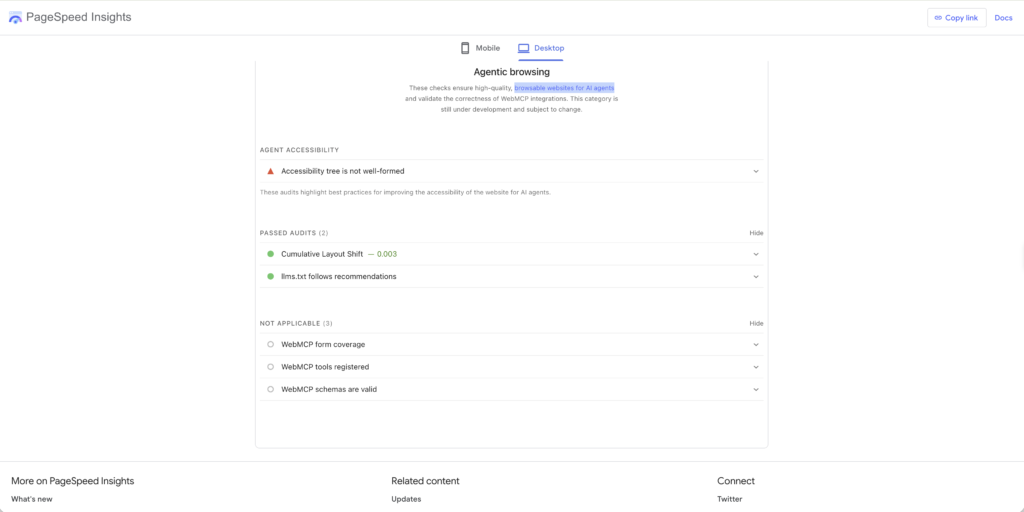
Two passes. One failure. Three not-applicable.
- ✅ Cumulative Layout Shift — 0.003
- ✅ llms.txt follows recommendations
- 🔺 Accessibility tree is not well-formed
- ⚪ WebMCP tools registered — N/A
- ⚪ WebMCP form coverage — N/A
- ⚪ WebMCP schemas are valid — N/A
Then I opened the llms.txt file that passed.
The green check that lies
Here is what my site was serving to any AI agent that asked it for a machine-readable summary:
# PS Harish: 26\+ Years Professional in Marketing, Business Process
Automation, and Digital Transoformation

## Pages
- [PSHarish](https://pshwebsite.ddev.site/)
- [Blogs](https://pshwebsite.ddev.site/blogs)
- [Contact  Me]()
Update, [date]: I’ve since fixed it. The file now points at psharish.com, lists every published post, and no longer opens with a byte-order mark. I’ve left the original above because the broken version is the point of this post.
pshwebsite.ddev.site is my local development environment. My SEO plugin generated the file on my laptop, the URLs got baked in, and it shipped to production. Nine of the twelve links point there. Three more are empty parentheses. “Transformation” is misspelled in the title. And the file opens with a byte-order mark, so the first character an agent’s parser encounters isn’t the # it’s looking for.
The .ddev.site domain does resolve publicly, which makes this worse rather than better. It resolves to 127.0.0.1. Every link in my agent-facing summary points a visiting agent back at its own loopback address.
Lighthouse passed it.
And per Chrome’s own documentation, that pass means precisely one thing: something was served at that URL without a server error. The audit does not parse the file. It does not follow the links. If the file were missing entirely, the audit would be marked Not Applicable, because providing it is still optional.
The audit can confirm that the file exists. It cannot confirm that the file is well-formed — and it certainly cannot confirm that the file is true.
That’s the lesson I’d take from all of this, and it applies whether you’re a developer or a CMO. Agentic readiness is not a checklist you pass. It’s whether a machine can actually complete a task on your property. I had a green checkmark sitting on top of a file that sends AI agents to localhost.
Your CMS is probably generating agent-facing artifacts right now that nobody on your team has read. Go read yours.
About those three N/As
Three WebMCP checks came back “not applicable,” which is an easy thing to scroll past. It reads like doesn’t concern me.
I want to be careful here, because the docs don’t spell out what N/A means on these particular audits, and there are at least two innocent explanations: the WebMCP audits require origin-trial enrolment, which my site doesn’t have, and two of the three are informational rather than pass/fail. So I’m not going to tell you N/A is a failing grade.
What I will say is that on my site the underlying reality is not in dispute: I have exposed exactly zero capability to agents. There is nothing here for a machine to do, only things for it to read.
For a content site, fine. That’s the job. The accessibility tree failure is my real problem.
For the founder I was arguing with, that same row is the entire conversation. His store has a catalogue, a cart, and a checkout, and not one of them is addressable by anything other than a human with a mouse. It’s a store that is finished, but not optimized, just for a new kind of visitor.
Back to the argument
His objection was about intent. My customers won’t want to.
But intent was never the bottleneck. Capability is. If an agent physically cannot complete a purchase on your store, it does not matter how willing your customer is — the behaviour has nowhere to land, so it never shows up in your data, so you conclude there’s no demand.
We have run this exact sequence before. Nobody was “shopping on their phone” in 2009 either. The behaviour didn’t appear and then summon mobile-optimised sites. The infrastructure got built, the friction dropped, and the behaviour followed — and the brands who waited for proof of demand spent the next three years buying their way back into a channel they could have owned. Waiting has a price you can actually put a number on. I walk through the calculation in The Cost of Inaction.
I don’t know if he’s wrong about his particular customers. He might not be. Household-goods reordering is a narrow slice, and plenty of categories will stay stubbornly human for a long time.
But the argument has quietly changed shape. It used to be a question about consumer psychology. Now Chrome ships a diagnostic that asks how much of your site is built to be operated by something other than a human — and the honest answer for almost every site on the internet today is none of it.
What I’d actually do this quarter
Ranked by cost-to-value, not by excitement:
- Fix your accessibility markup. Programmatic names on every interactive element, valid roles, nothing interactive hidden from the tree. It’s free, it’s overdue, it helps disabled users who were always entitled to it, and it happens to be the exact substrate agents read. There has never been a better business case for the thing you should have done anyway.
- Open your llms.txt and read it. Not the audit result. The file. I promise this takes four minutes and there is a non-trivial chance you find what I found.
- Check your CLS. You’re probably already tracking it. The stakes just went up from irritation to failed transaction.
- WebMCP — only if you have real transactional flows. It’s experimental and origin-trial gated. If you run a store with a catalogue and a checkout, start reading now. If you run a blog, you can wait.
The unglamorous truth is that three of those four are things web teams have been told to do for a decade for accessibility and Core Web Vitals reasons. The agentic web didn’t invent new work. It just gave the existing work a revenue argument.
And if you take nothing else from this: go and open your own llms.txt before you trust the green tick sitting above it. Mine was wrong for months and the audit never once complained.
At a Glance: The Four Agentic Browsing Checks
| Check | What it looks at | What a pass actually tells you | My site | Priority this quarter |
|---|---|---|---|---|
| Accessibility tree | Programmatic names on interactive elements, valid roles and parent-child relationships, nothing interactive hidden from the tree | The agent’s “primary data model” is readable | 🔺 Failed | 1. Free, overdue, and it’s what agents read |
| llms.txt | Whether something is served at your domain root | Only that the file was served without a server error, not that it’s well-formed or true | ✅ Passed (while pointing agents at localhost) | 2. Open the file and read it |
| Cumulative Layout Shift | Whether the layout moves after load | The page won’t jump between an agent finding a button and clicking it | ✅ 0.003 | 3. Already tracked; the stakes are now failed transactions |
| WebMCP (3 checks) | Whether the site declares actions an agent can take, such as search, add to cart or check order status | Tools are registered and visible to the agent | ⚪ N/A | 4. Only if you have real transactional flows |
Frequently Asked Questions
It’s a new, experimental Lighthouse category that sits alongside Performance, Accessibility, Best Practices and SEO. Instead of asking how your site feels to use, it asks how well your site is built for machine interaction: whether an AI agent can read it and act on it. It needs Chrome 150 or later, and the WebMCP checks need origin-trial registration.
Because the standards for the agentic web are still emerging. Chrome’s docs say the focus is on gathering data and giving actionable signals rather than a definitive ranking. You get a pass ratio plus pass/fail flags instead of a 0–100 number, which is harder to game and more honest about how early this is.
No. The check only confirms that something was served at that URL without a server error. It doesn’t parse the file and doesn’t follow the links. Mine passed while nine of its twelve links pointed at my local development environment. Open the file and read it yourself.
Agents don’t see your page. They read the accessibility tree, the same structured representation a screen reader uses, and Chrome’s docs call it the agent’s “primary data model.” Missing programmatic names, invalid roles or hidden interactive elements make your site harder for an agent to operate. Your accessibility markup is now your API.
Only if you have real transactional flows. WebMCP lets a site declare what an agent can do on it (search the catalogue, add to cart, check order status) instead of leaving the agent to guess its way through the UI. It’s experimental and gated by an origin trial. If you run a store, start reading now. If you run a blog, you can wait.
For some categories, probably not for a long time. Low-consideration repeat purchases like dish soap, printer ink and water filters are the likeliest to go first. But intent was never the real bottleneck. Capability is. If an agent can’t complete a purchase on your store, the behaviour never shows up in your data, and you conclude there’s no demand.
Work with me
I’ve spent 26 years in marketing, business process automation and digital transformation — most of it finding the revenue that D2C and e-commerce brands are quietly leaking through their martech stack, and then fixing the plumbing that’s causing it.
I’m currently open to full-time roles leading digital transformation, marketing operations or growth. I’m also taking on consulting and fractional work in the meantime, and I’m open to relocating for the right team.
If your site just failed an audit you didn’t know existed — or if you’re trying to work out what any of this means for your revenue next year — I’d genuinely enjoy that conversation. For the full technical picture, this is the ground the C.R.A.W.L. Audit covers.
📩 harish@psharish.com · Connect on LinkedIn
By PS Harish
20 August 2026Comments
No comments yet.


Leave A Comment